Exposing Services More Safely
Fuck, it’s so easy to rely on LLMs to configure and write things for you. I should try to learn what I’m doing, and do it once, before turning the barely controllable hallucination machine loose to do what it wants in my repos.
Digging the tunnel myself#
Lets talk about what the goal is here: I want to expose the services I host to the internet, but in a safe(r) way. Cloudflare Tunnels offer to do that, but I don’t want to use something proprietary like that, which would lock me into a single vendor.
After a little digging (not a ton tbqh, but enough to start throwing yaml at the wall and seeing what sticks), I came up with roughly the following solution:
- Pangolin for the tunneling
- Ansible run as a Gitea (maybe Forgejo in the future?) runner to push the config to the VPS when a new revision is save.
- Some random VPS with a public IP running Debian
A lil background#
Keeping it super high level: Everything runs in a Kubernetes Cluster running on Talos VMs. I try to keep different services in different namespaces when it makes sense (and I’m not being lazy). Lots of the usual GitOps & k8s suspects; ArgoCD, Renovate, Gitea & it’s runner, Authentik, Traefik.
Open questions#
I’m going into this with a few questions:
- How the fuck do I use Ansible?
- Assumption: With moderate to great difficulty getting started
- Do I still need Traefik for the ingresses on my k8s cluster?
- Assumption: Prolly, I doubt Pangolin cares about the k8s stuff, it just wants to send packets.
Resources#
I’m far from the first to do this, I don’t think I’m blazing a new trail. Since most of what I’m doing is probably just gonna be referring to other blog posts, I’ll note them down here:
- Ansible
- Pangolin
Breaking ground on the VPS#
Getting started#
Huge caveat: I originally did just tell Claude:
Hey, set all this ansible/pangolin/etc. stuff up
But then before even looking at what it spit out, I had the thought at the
beginning of this post. I had Claude take everything it spit out, and put that
in it’s own branch. I’ll keep building on main and see how it compares at the
end of this.
I’m writing this kinda stream of conciousness style, apologies if it gets a little rambly.
Ansible#
Okay, I’ll copy an existing Gitea runner config I have, to use that as a template to make sure auth & a basic Hello World works (all the secrets are defined within the config of the repo):
.gitea/workflows/ansible.yaml
name: Run Ansible Playbook

on:
  push:
    branches:
      - main
  pull_request:
  workflow_dispatch:

jobs:
  hello-world:
    runs-on: ubuntu-latest # Name of the runner
    container:
      image: docker.io/library/debian:stable-slim # Actual image this runs on
    steps:
      - name: Install SSH
        run: |
          apt-get update
          apt-get install -y openssh-client

      - name: Configure SSH key
        env:
          SSH_KEY: ${{ secrets.SSH_PRIVATE_KEY }}
          KNOWN_HOSTS_DATA: ${{ secrets.SSH_KNOWN_HOST }}
        run: |
          mkdir -p ~/.ssh
          echo "$SSH_KEY" > ~/.ssh/vps_deploy
          chmod 600 ~/.ssh/vps_deploy
          echo "$KNOWN_HOSTS_DATA" > ~/.ssh/known_hosts
          chmod 644 ~/.ssh/known_hosts

      - name: Touch the VPS
        run: |
          ssh -o IdentitiesOnly=yes -i ~/.ssh/vps_deploy ${{ secrets.VPS_USER }}@${{ secrets.VPS_HOST }} 'echo yes > did-it-work.txt'
Took a lil bit of back and forth, but we can now hit the VPS from the runner.
Lets take a look at Ansible now (this is also where I learn the right terminology I should be looking up, like “run an Ansible playbook”). Next I had to update the runner to checkout the code, install Ansible, and set the VPS in the inventory file (I switched back to the default runner so I could use the prebuilt action, being a lil lazy):
name: Run Ansible Playbook

on:
  push:
    branches:
      - main
  pull_request:
  workflow_dispatch:

jobs:
  ansible:
    runs-on: ubuntu-latest # Name of the runner
    steps:
      - name: Checkout code
        uses: actions/checkout@v7

      - name: Install packages
        run: |
          apt-get update
          apt-get install -y python3-pip python3-venv
          python3 -m pip install ansible

      - name: Configure SSH key
        env:
          SSH_KEY: ${{ secrets.SSH_PRIVATE_KEY }}
          KNOWN_HOSTS_DATA: ${{ secrets.SSH_KNOWN_HOST }}
        run: |
          mkdir -p ~/.ssh
          echo "$SSH_KEY" > ~/.ssh/vps_deploy
          chmod 600 ~/.ssh/vps_deploy
          echo "$KNOWN_HOSTS_DATA" > ~/.ssh/known_hosts
          chmod 644 ~/.ssh/known_hosts

      - name: Update the inventory
        run: |
          sed -i 's/VPS_HOST/${{ secrets.VPS_HOST }}/' ansible/inventory.ini

      - name: Ping the host
        run: |
          ansible myhost -m ping -i ansible/inventory.ini --private-key ~/.ssh/vps_deploy
And we see the Ansible ping:
 SUCCESS => {
    "ansible_facts": {
        "discovered_interpreter_python": "/usr/bin/python3"
    },
    "changed": false,
    "ping": "pong"
}
I also wanted to test using a playbook, so I did that with these files:
.gitea/workflows/ansible.yaml
[...]
      - name: Run the playbook
        run: |
          ansible-playbook -i ansible/inventory.ini ansible/playbook.yaml --private-key ~/.ssh/vps_deploy
ansible/playbook.yaml
- name: Basic Playbook
  hosts: myhost
  tasks:
   - name: Ping my hosts
     ansible.builtin.ping:
Which worked just fine:
3s
Run ansible-playbook -i ansible/inventory.ini ansible/playbook.yaml --private-key ~/.ssh/vps_deploy
PLAY [Basic Playbook] **********************************************************
TASK [Gathering Facts] *********************************************************
[WARNING]: Platform linux on host *** is using the discovered Python
interpreter at /usr/bin/python3, but future installation of another Python
interpreter could change the meaning of that path. See
https://docs.ansible.com/ansible-
core/2.17/reference_appendices/interpreter_discovery.html for more information.
ok: [***]
TASK [Ping my hosts] ***********************************************************
ok: [***]
PLAY RECAP *********************************************************************
***               : ok=2    changed=0    unreachable=0    failed=0    skipped=0    rescued=0    ignored=0
Lets pause this for a sec, and got to Pangolin before tying it together.
Pangolin#
Pangolin has a Docker Compose guide, which seem good to me, so I’m just gonna copy & paste their configs to start. Only thing I changed is just using my url instead of the example.
Slapping those two together#
Okay, the runner now needs to make sure that it has docker available for Ansible (we’ll use Jeff Geerlings Docker role, he’s a pretty cool guy):
ansible/requirements.yml
---
roles:
  - name: geerlingguy.docker
    version: 8.0.0
.gitea/workflows/ansible.yaml
[...]
      - name: Install packages & dependencies
        run: |
          apt-get update
          apt-get install -y python3-pip python3-venv
          python3 -m pip install ansible
          ansible-galaxy collection install community.docker      # Docker tools
          ansible-galaxy role install -r ansible/requirements.yml # Docker installation
ansible/playbook.yaml
- name: Pangolin
  hosts: myhost
  become: true

  roles:
    - role: geerlingguy.docker

  vars:
    project_path: "/opt/pangolin"

    docker_edition: 'ce'
    docker_service_state: started
    docker_service_enabled: true
    docker_install_compose_plugin: true
    docker_compose_package: docker-compose-plugin
    docker_users:
      - "{{ ansible_user_id }}"
[...]
Now that Docker is set up in the playbook, lets have it actually copy over and start the Docker Compose:
ansible/playbook.yaml
[...]
    - name: Ensure target directory exists
      ansible.builtin.file:
        path: "{{ project_path }}"
        state: directory
        mode: '0755'

    - name: Copy docker shtuff to server
      ansible.builtin.copy:
        src: ../docker-compose/
        dest: "{{ project_path }}/"

    - name: Deploy or update the Compose Stack
      community.docker.docker_compose_v2:
        project_src: "{{ project_path }}"
        state: present
        pull: always
It works, now we got this:
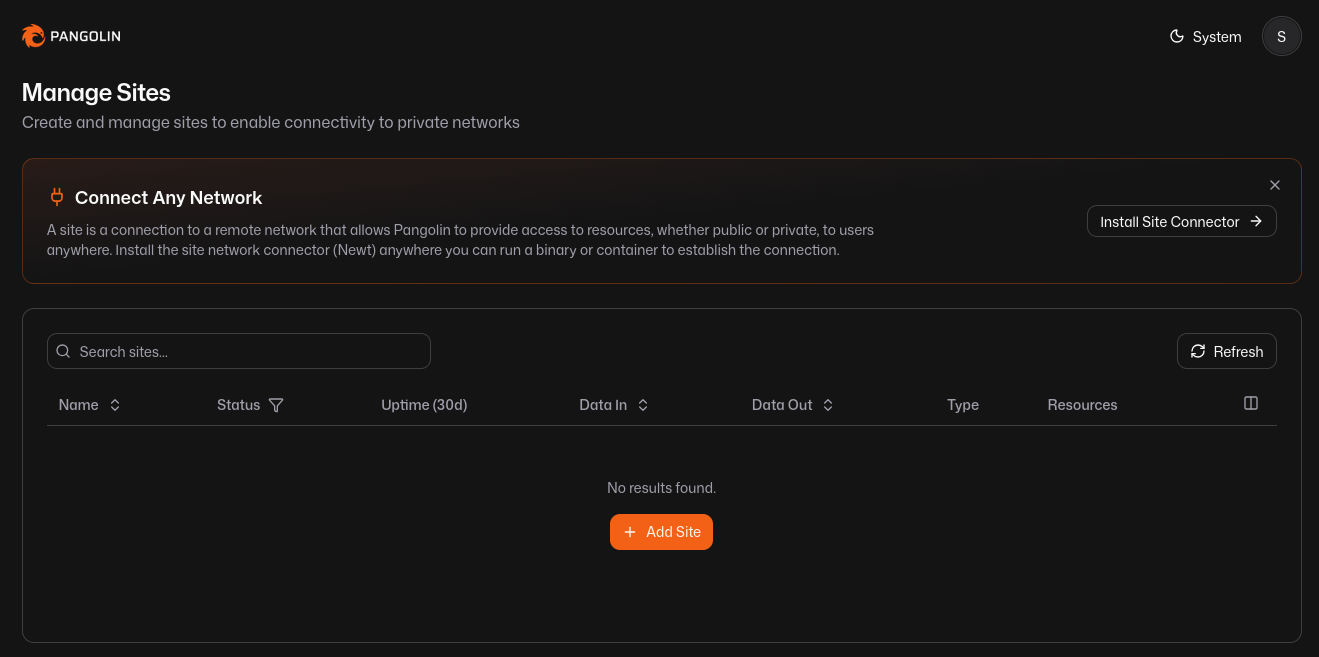
Time to get to work on actually connecting it to the local system.
Local work#
Pangolin actually has a setup wizard built into the dashboard:
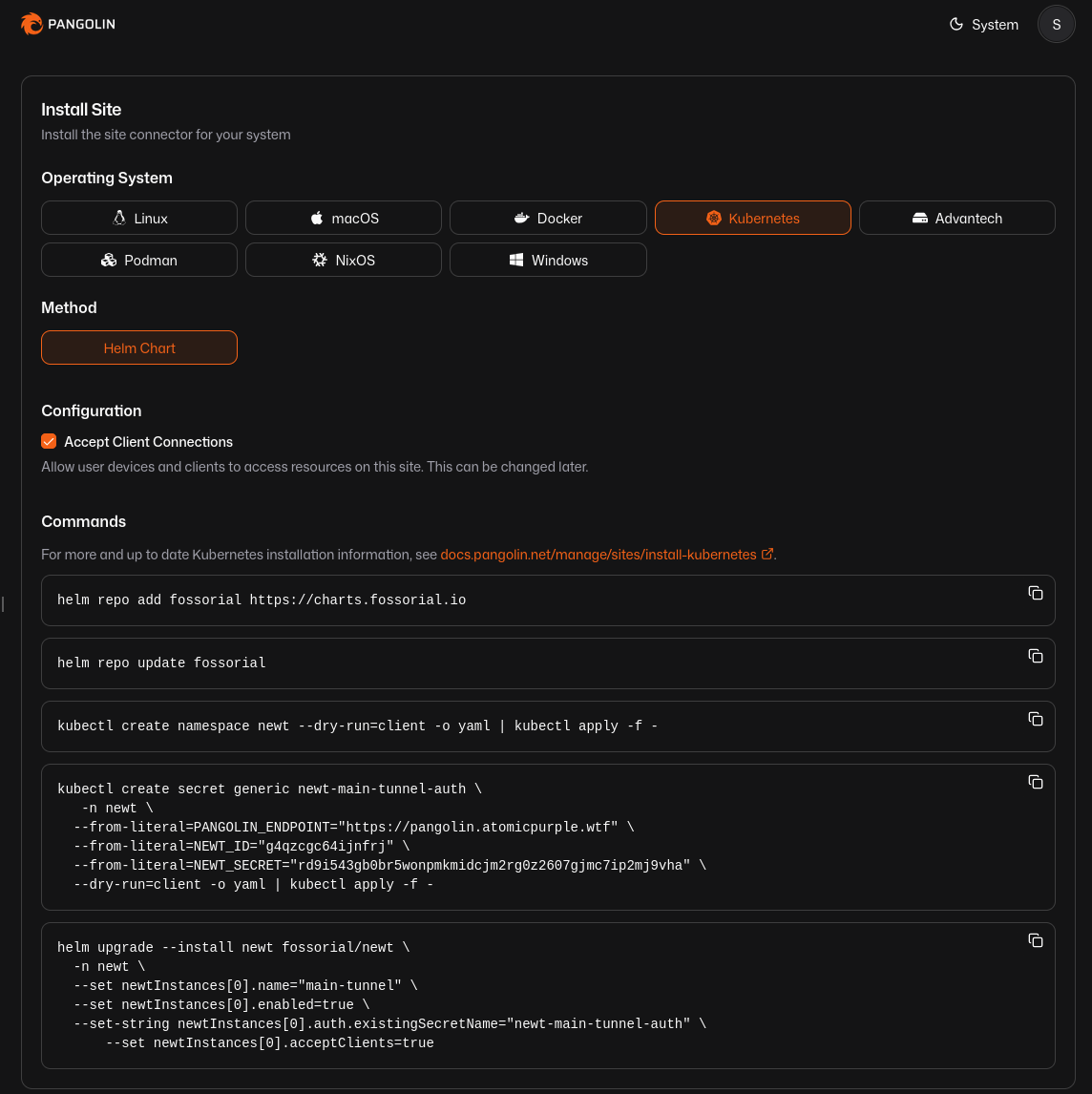
(I didn’t use those secrets or IDs, don’t even try)
I followed the first 3 steps to add the repo, update it, then create the namespace. I started to diverge afterwards though, I put the secrets into my OpenBao instance. That means we’ll need to change up the final command to actually deploy it from a command, to a number of different files for ArgoCD to manage:
(these file paths are in my k8s repo, not the vps repo)
argocd/apps/pangolin.yaml
apiVersion: argoproj.io/v1alpha1
kind: Application
metadata:
  name: pangolin
  namespace: argocd
spec:
  project: default
  sources:
    - repoURL: <my git repo>
      targetRevision: main
      ref: values
    - chart: newt
      repoURL: https://charts.fossorial.io
      targetRevision: 1.5.0
      helm:
        valueFiles:
          - $values/pangolin/values.yaml
    - repoURL: <my git repo>
      targetRevision: main
      path: pangolin
      directory:
        include: 'secret-store.yaml'
  destination:
    server: https://kubernetes.default.svc
    namespace: newt
  syncPolicy:
    automated:
      prune: true
      selfHeal: true
    syncOptions:
      - CreateNamespace=true
pangolin/secret-store.yaml
apiVersion: v1
kind: ServiceAccount
metadata:
  name: eso-auth
  namespace: newt
---
apiVersion: external-secrets.io/v1
kind: SecretStore
metadata:
  name: openbao-backend
  namespace: newt
spec:
  provider:
    vault:
      server: "http://192.168.1.23:8200"
      version: "v2"
      path: "secret"
      auth:
        kubernetes:
          mountPath: "kubernetes"
          role: "eso-role"
          serviceAccountRef:
            name: "eso-auth"
---
apiVersion: external-secrets.io/v1
kind: ExternalSecret
metadata:
  name: newt-main-tunnel-auth-sync
  namespace: newt
spec:
  refreshInterval: "1h"
  secretStoreRef:
    name: openbao-backend
    kind: SecretStore
  target:
    name: newt-main-tunnel-auth
    creationPolicy: Owner
  data:
    - secretKey: PANGOLIN_ENDPOINT
      remoteRef:
        key: pangolin/atomicpurple
        property: PANGOLIN_ENDPOINT
    - secretKey: NEWT_ID
      remoteRef:
        key: pangolin/atomicpurple
        property: NEWT_ID
    - secretKey: NEWT_SECRET
      remoteRef:
        key: pangolin/atomicpurple
        property: NEWT_SECRET
pangolin/values.yaml
newtInstances:
  - name: main-tunnel
    enabled: true
    acceptClients: true
    auth:
      existingSecretName: newt-main-tunnel-auth
So I added this all, pushed and ArgoCD synced it all happily. Buuuut, I’m
getting a 404 now when trying to visit the blog, so we need to investigate.
Digging deeper#
The site says online, and nothing immediately obvious in the logs. I think I need to add a Resource. Which I did, but it’s still 404ing. Turns out I was only serving via 443 locally, while the blog service was trying to reach it on 80. So I cut down the ingress from:
apiVersion: networking.k8s.io/v1
kind: Ingress
metadata:
  name: blog-ingress
  namespace: blog
  annotations:
    cert-manager.io/cluster-issuer: "letsencrypt-prod"
    traefik.ingress.kubernetes.io/router.entrypoints: websecure
    traefik.ingress.kubernetes.io/router.tls: "true"
spec:
  tls:
    - hosts:
        - atomicpurple.wtf
      secretName: atomicpurple-tls
  rules:
    - host: atomicpurple.wtf
      http:
        paths:
          - pathType: Prefix
            path: "/"
            backend:
              service:
                name: blog-service
                port:
                  number: 80
to
apiVersion: networking.k8s.io/v1
kind: Ingress
metadata:
  name: blog-ingress-internal
  namespace: blog
  annotations:
    traefik.ingress.kubernetes.io/router.entrypoints: web
spec:
  ingressClassName: traefik
  rules:
    - host: atomicpurple.wtf
      http:
        paths:
          - pathType: Prefix
            path: "/"
            backend:
              service:
                name: blog-service
                port:
                  number: 80
and we are golden! You know it’s working because you’re reading this post right now!
Follow-up#
I probably don’t need anything like Anubis, but I’ll keep it in mind for the future.
I should probably also make sure all of the configs that are VPS side get saved, I don’t wanna deal with manual config if I don’t have to.
🤫 This is also secretly part 1 of a series where I’m making things more robust in general (bug Hugo doesn’t seem to have a spoiler text for me to use).